Coming to iPhone and Android
Take a photo. Tab reads every line.
The shop, the date, the total and each item, filled in for you. Then find any receipt again, see where your money goes, and split the bill item by item, even with friends who don't have Tab.


Reading
Every line, read.
Photograph a receipt, or import one. Tab fills in the shop, date, total and every item. Fix anything it got wrong, and it never writes over what you changed.

- Every receipt you keep, newest first.
- Open one: the shop, the date and the total, read from the photo.
- Every item on it, line by line.
- Filed under Dining, paid by card, in Dublin.
- And what you have spent at that shop so far.
Kept, and easy to find.
Library
Find it again.
Search, filter and sort everything you've kept. Sort it into folders and tags that make sense to you, and keep home and work apart in separate workspaces.
Insights
See where it all goes.
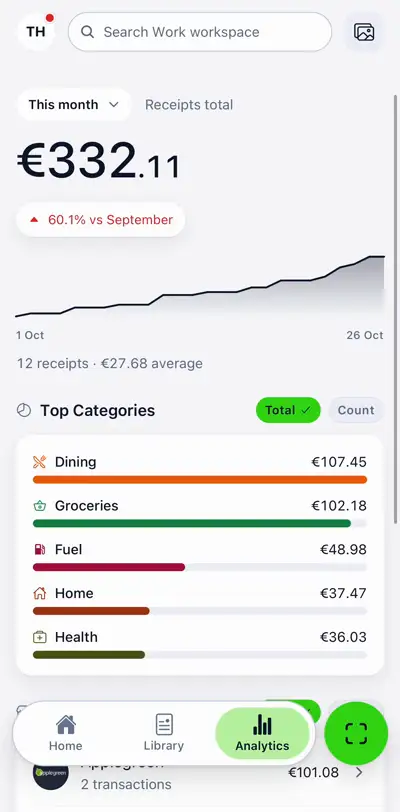
Your spending by category and by shop, month by month, with the shops' own logos. Tap any figure to see the receipts behind it.


Split a bill
Who had what?
Tap an item, then whoever had it. Shared plates are divided between the people who shared them, and tax and tip follow what each person had. Or just split it evenly.
Try it on a real bill
- Tap an item and say who had it. The wings: you.
- The chicken sandwich: Sophie.
- The fries: Liam.
- The lemonade: you and Sophie, shared.
- All €43.43 assigned. Each person gets a link with only their share.
Privacy and security
Locked, every time.
Tab won't open without your passcode, Face ID or fingerprint. You choose whether it locks the moment you leave or a minute later.
More on privacy and securityAnd the rest.
Any currency.
Spent abroad? Tab converts each receipt into your currency at the rate on the day you paid.
Rules that file for you.
Tell Tab once, and it moves or tags new receipts by the card you paid with, how you paid or the category.
Works without signal.
Tab saves everything on your phone first and catches up when you're back online.
Shops, recognised.
Tab puts a name and logo to the shops it knows, and you can correct any shop it gets wrong.
Tab is nearly here.
It's in testing now, on its way to the App Store and Google Play. The download links go right here the day it's out.
Support Tab
Tab is free, has no ads and is made by two people. If it saves you some time, chip in whatever you like. Giving doesn't unlock anything; it just keeps Tab going.
Support Tab